
Reset Your Password
We cannot see your current password. To set a new one, please follow these steps:
- Click the button below.
- Enter your account email address on the next page.
- Check your inbox to find your reset link (please allow up to 15 minutes for the email to arrive).
Sign In
In the top menu, look inside the “Members” menu for “Sign In”. Enter your email address and password.
Competition Rules
Read our rules before you upload.
Upload Photos
Only jpg/jpeg files, use a very high quality setting.
Member Gallery
Flagpole Private Meetup Forum: Share Your Photo Adventures
Join fellow club members for impromptu photo outings. Our members-only forum is the perfect place to coordinate trips to unique locations like tulip farms, zoos, fairs, and more.
It’s a space to carpool, share tips, and learn together – while capturing photos.
How to Get Involved:
- Propose a Trip: All members are welcome to post new outing ideas.
- Find an Outing: Browse the forum for upcoming trips. Look for locations and dates in the post titles.
- RSVP: Connect with organizers and fellow attendees by replying to a post.
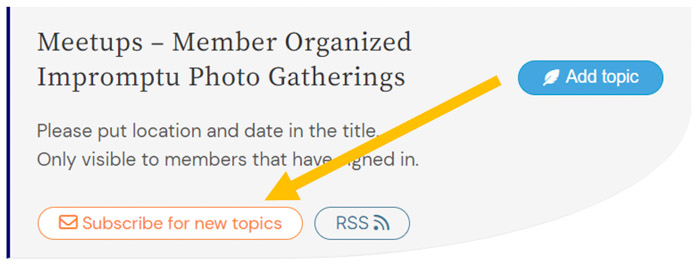
- If Not Subscribed: Click “Subscribe for new topics” at the top of the forum to receive email notifications for all new meetups.
- If Subscribed: Click “Unsubscribe for new topics” at the top of the forum to stop receiving email notifications for all new meetups.
Important Details:
- Private Forum: Please note this forum is only visible to signed-in members, keeping all meetup details (people, places, and dates) private.
- Guests Welcome: Feel free to bring guests! Simply add a note to your RSVP so the organizer knows.
- Easy Access: Find the forum anytime in the main menu under Members -> Meetup Forum.
TIP – Subscribe to receive emails as new forums are added.
Bring Your Photos to Life as a Slideshow!
Want to see photos in a dynamic new way? It’s easy to start a slideshow complete with music.
To Start the Show: Simply scroll to the bottom of any photo gallery page and click the “Play Movie of Photos” button.
To Customize Your Experience: After the movie starts, look for the vertical ellipsis menu (⋮). Click it to:
- Set the Mood: Choose from different music genres.
- Control the Pace: Adjust the slideshow speed to your liking.
Sit back and enjoy the show!
Sync Flagpole Events with Your Digital Calendar
Keep track of all our club programs, workshops, and competitions by adding them directly to your preferred digital calendar (like Google Calendar, Apple Calendar, or Outlook).
Step-by-Step Guide
- Find Our Events: A complete list of upcoming events is located at the bottom of the Flagpole homepage and https://flagpolephotographers.com/all-events
- Select an Event: Click on any event from the list to view its full details, including time, location, and description.
- Add to Your Calendar: In the ‘WHEN’ ‘WHERE’ blue bar area – on the far right are the Add to Calendar links.
- Click “Google” to add the event to your Google calendar.
- Click “Outlook” to add the even to your to most other calendars.
Easily Access Your Online Meeting Links!
Ready to Join Our Online Meetings? Here’s How!
Getting connected is simple. Just follow these steps to find your meeting link right on our website.
Your 3-Step Guide:
- Pick Your Event: Scroll down to the “Upcoming Events” section on our home page.
- Open the Event Page: Click on the meeting you’re attending.
- Locate the Link: You’ll find the online meeting link near the top of the event page in the ‘WHERE’ section.
A Couple of Quick Reminders:
- Link Activation: Please note the link will only work on the day of the scheduled meeting.
- Where to Look: We post all links directly on the event page, so there’s no need to search your email inbox.
